

问答社区
分析和在1000个社交媒体网站上查找个人资料的API、CLI和Web应用程序
分类:技术分享
社交分析器(Social Analyzer)——一个集API、命令行工具和Web应用于一体的多平台分析工具,可帮助您跨越1000+社交媒体网站查找并分析个人资料。该工具包含多种分析和检测模块,您能在调查过程中自由选择需要启用的功能模块
这款OSINT工具的分析结果及公开提取的信息,可协助调查涉及网络欺凌、网络诱骗、网络跟踪以及传播虚假信息等可疑或恶意活动的用户资料。
使用户能够创建和分享内容或参与社交网络的网站和应用程序 - 牛津词典
Structure结构
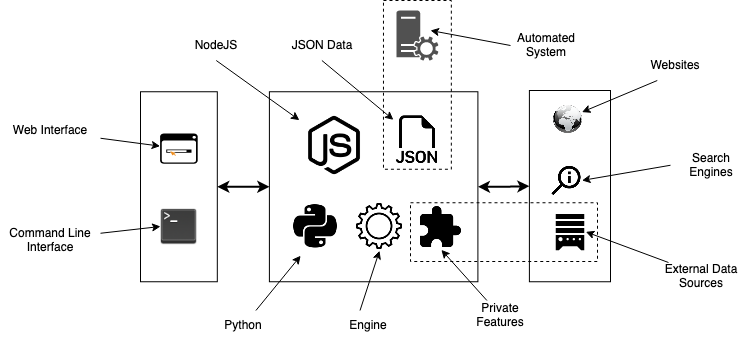
Features功能特性
- String & name analysis (Permutations and Combinations)
字符串与名称分析(排列组合) - Find a profile using multiple techniques (HTTPS library & Webdriver)
通过多种技术(HTTPS库和Webdriver)查找个人资料 - Multi profile search (Used for correlation - any combination separated with "," )
Multi profile search(用于相关性分析 - 任何组合用“,”分隔) - Multilayers detections (OCR, normal, advanced & special)
多层检测(OCR、常规、高级及特殊) - Visualized profile information using Ixora (Metadata & Patterns)
使用Ixora(元数据与模式)实现可视化档案信息 - Metadata & Patterns extraction (Added from Qeeqbox OSINT project)
元数据与模式提取(源自Qeeqbox OSINT项目) - Force-directed Graph for Metadata (Needs ExtractPatterns)
面向元数据的力导向图(需ExtractPatterns) - Search by top ranking or by country (Alexa Ranking)
按最高排名或按国家/地区搜索(Alexa 排名) - Search by type (adult, music, etc.. - automated websites stats)
按类型搜索(成人、音乐等... - 自动化网站统计) - Profiles stats and static info (Category country)
个人资料统计与静态信息(国家类别) - Cross Metadata stats (Added from Qeeqbox OSINT project)
跨元数据统计(源自Qeeqbox OSINT项目) - Auto-flirtation to unnecessary output (Enable javascript etc..)
自动调情至不必要输出(启用JavaScript等...) - Search engine lookup (Google API - optional)
搜索引擎查询(Google API - 可选) - Custom search queries (Google API & DuckDuckGo API - optional)
自定义搜索查询(Google API 和 DuckDuckGo API - 可选) - Profile screenshot, title, info, and website description
个人资料截图、标题、信息及网站描述 - Find name origins, name similarity & common words by language
按语言查找名称起源、名称相似性及常见词汇 - Find possible profile\person age (Limited analysis)
查找可能的个人资料/年龄(有限分析) - Custom user-agent, proxy, timeout & implicit wait
自定义用户代理、proxy、超时及隐式等待 - Python CLI & NodeJS CLI (limited to FindUserProfilesFast option)
Python CLI & NodeJS CLI(仅限FindUserProfilesFast选项) - Screenshots of detected profile (The latest version of Chrome must be installed)
检测到的配置文件截图(必须安装最新版本的Chrome) - Grid option for faster checking (limited to docker-compose)
网格选项,用于更快检查(仅限于 docker-compose) - Dump logs to folder or terminal (prettified)
将日志转储到文件夹或终端(美化输出) - Adjust finding\getting profile workers (default 15)
调整查找/获取配置文件工作线程数(默认为15) - Re-checking option for failed profiles
对失败配置文件的重新检查选项 - Filter profiles by good, maybe, and bad
按 good、maybe 和 bad 筛选配置文件 - Save the analysis as a JSON file
将分析存档为 JSON 文件 - Simplified web interface and CLI
简化的 Web 界面和 CLI -
Special Detections特殊检测
- Facebook (Phone number, name, or profile name)
Facebook(电话号码、姓名或资料名称) - Gmail (example@gmail.com)
[Gmail] (example@gmail.com) - Google (example@example.com)
谷歌(example@example.com)
Install & Run安装与运行
Linux (As Node WebApp)
sudo apt-get update
#Depedning on your Linux distro, you may or may not need these 2 lines
sudo DEBIAN_FRONTEND=noninteractive apt-get install -y software-properties-common
sudo add-apt-repository ppa:mozillateam/ppa -y
sudo apt-get install -y firefox-esr tesseract-ocr git nodejs npm
git clone https://github.com/qeeqbox/social-analyzer.git
cd social-analyzer
npm update
npm install
npm start
Linux (As Node CLI)
sudo apt-get update
#Depedning on your Linux distro, you may or may not need these 2 lines
sudo DEBIAN_FRONTEND=noninteractive apt-get install -y software-properties-common
sudo add-apt-repository ppa:mozillateam/ppa -y
sudo apt-get install -y firefox-esr tesseract-ocr git nodejs npm
git clone https://github.com/qeeqbox/social-analyzer.git
cd social-analyzer
npm install
nodejs app.js --username "johndoe"
#or
nodejs app.js --username "johndoe,janedoe" --metadata
#or
nodejs app.js --username "johndoe,janedoe" --metadata --top 100
#or
nodejs app.js --username "johndoe" --type "adult"
Linux (As python package)
sudo apt-get update
sudo apt-get install python3 python3-pip
pip3 install social-analyzer
python3 -m social-analyzer --username "johndoe"
#or
python3 -m social-analyzer --username "johndoe" --metadata
#or
python3 -m social-analyzer --username "johndoe" --metadata --top 100
#or
python3 -m social-analyzer --username "johndoe" --type "adult"
#or
python3 -m social-analyzer --username "johndoe" --websites "car" --logs --screenshots
Linux (As python script)
sudo apt-get update
sudo apt-get install git python3 python3-pip
git clone https://github.com/qeeqbox/social-analyzer
cd social-analyzer
pip3 install -r requirements.txt
python3 app.py --username "janedoe"
#or
python3 app.py --username "johndoe" --metadata
#or
python3 app.py --username "johndoe" --metadata --top 100
#or
python3 app.py --username "johndoe" --type "adult"
#or
python3 app.py --username "johndoe" --websites "car" --logs --screenshots
Importing as object (python)
#E.g. #1
from importlib import import_module
SocialAnalyzer = import_module("social-analyzer").SocialAnalyzer()
results = SocialAnalyzer.run_as_object(username="johndoe",silent=True)
print(results)

#E.g. #2
from importlib import import_module
SocialAnalyzer = import_module("social-analyzer").SocialAnalyzer()
results = SocialAnalyzer.run_as_object(username="johndoe,janedoe",silent=True,output="json",filter="good",metadata=False,timeout=10, profiles="detected")
print(results)
Linux, Windows, MacOS, Raspberry pi..
- check this wiki for all possible installation methods
看看这个维基适用于所有可能的安装方式 - check this wiki for integrating social-analyzer with your OSINT tools, feeds, etc...
看看这个wiki用于将 social-analyzer 与您的 OSINT 工具、数据源等集成...
social-analyzer --h
Required Arguments: --username E.g. johndoe, john_doe or johndoe9999 Optional Arguments: --websites A website or websites separated by space E.g. youtube, tiktokor tumblr --mode Analysis mode E.g.fast -> FindUserProfilesFast, slow -> FindUserProfilesSlow or special -> FindUserProfilesSpecial --output Show the output in the following format: json -> json outputfor integration or pretty -> prettify the output --options Show the following when a profile is found: link, rate, titleor text --method find -> show detected profiles, get -> show all profiles regardless detected or not, all -> combine find & get --filter Filter detected profiles by good, maybe or bad, you can do combine them with comma (good,bad) or use all --profiles Filter profiles by detected, unknown or failed, you can do combine them with comma (detected,failed) or use all --countries select websites by country or countries separated by space as: us br ru --type Select websites by type (Adult, Music etc) --top select top websites as 10, 50 etc...[--websites is not needed] --extract Extract profiles, urls & patterns if possible --metadata Extract metadata if possible (pypi QeeqBox OSINT) --trim Trim long strings --gui Reserved for a gui (Not implemented) --cli Reserved for a cli (Not needed) Listing websites & detections: --list List all available websites Setting: --headers Headers as dict --logs_dir Change logs directory --timeout Change timeout between each request --silent Disable output to screen - Facebook (Phone number, name, or profile name)